SSL Certificate

Data encryption - keeping the data on your website safe

Issued in just 5 minutes
Covers both the domain and www
Mobile-friendly
Free reissues
Warranty included

HiTechCloud

SSL Certificate pricing

Data security - built for Google and Bing SEO - at an optimized cost

GoGetSSL®<br>Domain SSL

GoGetSSL®
Domain SSL

139.000 VND / year

An SSL certificate for one domain plus www

  • Issued in just 5 minutes
  • Show your site as secured
  • Free reissues
  • Mobile-friendly
  • 50,000$ Warranty

SSL installation support for hosting

SIGN UP NOW
GoGetSSL®<br>Multi-Domain SSL

GoGetSSL®
Multi-Domain SSL

499.000 VND / year

SSL for 3 domains using SAN, covering domain + www

  • Issued in just 5 minutes
  • Show your site as secured
  • Free reissues
  • Mobile-friendly
  • 50,000$ Warranty

SSL installation support for hosting

SIGN UP NOW
GoGetSSL®<br>Wildcard SSL

GoGetSSL®
Wildcard SSL

1.799.000 VND / year

SSL for one primary domain and its subdomains

  • Issued in just 5 minutes
  • Show your site as secured
  • Free reissues
  • Mobile-friendly
  • 50,000$ Warranty

SSL installation support for hosting

SIGN UP NOW
Sectigo ®<br>PositiveSSL<br>Domain

Sectigo ®
PositiveSSL
Domain

149.000 VND / year

An SSL certificate for one domain plus www

  • Issued in just 5 minutes
  • Show your site as secured
  • Free reissues
  • Mobile-friendly
  • 50,000$ Warranty

SSL installation support for hosting

SIGN UP NOW
Sectigo ®<br>PositiveSSL<br>Multi-Domain

Sectigo ®
PositiveSSL
Multi-Domain

699.000 VND / year

SSL for 3 domains using SAN, covering domain + www

  • Issued in just 5 minutes
  • Show your site as secured
  • Free reissues
  • Mobile-friendly
  • 50,000$ Warranty

SSL installation support for hosting

SIGN UP NOW
Sectigo ® PositiveSSL<br>Wildcard

Sectigo ® PositiveSSL
Wildcard

2.299.000 VND / year

SSL for one primary domain and its subdomains

  • Issued in just 5 minutes
  • Show your site as secured
  • Free reissues
  • Mobile-friendly
  • 50,000$ Warranty

SSL installation support for hosting

SIGN UP NOW

How to tell whether a website is protected by SSL

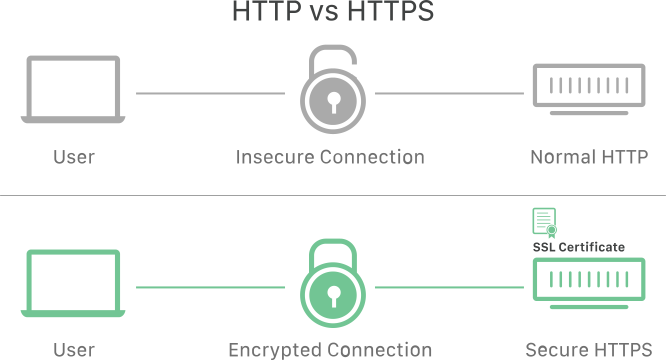
When a website is secured with an SSL certificate, the abbreviation HTTPS (HyperText Transfer Protocol Secure) appears in the URL. Without an SSL certificate, the URL shows only HTTP — no S for Secure. A padlock icon also appears in the address bar. This signals trust and reassures visitors to the site.

To view SSL certificate details, click the padlock icon in the browser bar. An SSL certificate normally includes:


  • The domain the certificate was issued for
  • Who or what it is issued to — a person, organization or device
  • Which certificate authority issued it
  • Digital signature of the certificate authority
  • Linked subdomain
  • Certificate issue date
  • Certificate expiration date
  • The public key (the private key is not disclosed)

Frequently asked questions about SSL certificates

What is SSL and how does it work?

SSL stands for Secure Sockets Layer, is a security protocol that encrypts data transmitted between a web server and a browser. SSL helps protect personal information, payment information, and other sensitive data during communication over the internet. To use SSL, a website needs an SSL certificate issued by a trusted authority.

An SSL certificate is a small data file that binds a public key and a private key to an organization's information. The public key is used to encrypt data, and the private key is used to decrypt it. An SSL certificate also verifies a website's identity, letting users know they are connecting to a secure site.

When a browser requests a connection to a website with SSL, it sends an SSL handshake request to the web server. The web server returns its SSL certificate and public key to the browser. The browser checks that the SSL certificate is valid and generates a session key encrypted with the web server's public key. The browser sends that session key back to the web server. The web server decrypts the session key with its private key and confirms the secure connection. The web server and browser then communicate over an SSL connection encrypted with the session key.

A website with SSL typically has an address starting with https:// instead of http://, along with a padlock icon or a green address bar in the browser. Users can click the icon or address bar to view the SSL Certificate details, including the organization name, issuing authority, and validity period.

What are the advantages of a paid SSL certificate over a free one?

A paid SSL is a website security certificate with several advantages over free SSL. Some advantages of paid SSL are:
- Higher reliability, because they are issued by established providers with rigorous validation processes.
- Has a longer validity period, typically 1 to 3 years, whereas free SSL is valid for only 30 to 90 days.
- Has better technical support, because a team of specialists is on hand to resolve SSL-related issues.
- Has stronger protection features, such as strong encryption, insurance cover in the event of an incident, and a green address bar or padlock icon that increases customer trust.

Which individuals or organizations should use a paid SSL certificate?

For any individual or organization that wants to ensure the safety of customers, especially where the website handles financial transactions or personal or sensitive information. A paid SSL Certificate also helps build customer trust and credibility, and can improve a website's search ranking compared with a free SSL Certificate.

How do I purchase a paid SSL certificate?

To obtain a paid SSL certificate you need a valid domain name and a web server that supports SSL. You can purchase paid SSL from HI-TECH CLOUD, a reputable SSL provider. Simply choose the SSL package that matches your requirements above, click to order and pay online. You will then receive a confirmation code and instructions for installing SSL on your website. If you are unable to install SSL yourself, send a support request to our engineering team after completing your order and we will activate SSL on your site quickly and securely.

What is GoGetSSL?

GoGetSSL supplies SSL certificates to websites worldwide. SSL encrypts data in transit between client and server, protecting sensitive user information from theft and tampering. GoGetSSL offers a range of certificate types to match different requirements and budgets, from simple domain validation to premium extended validation. GoGetSSL is a well-established, trusted brand, authorized by leading certificate authorities including Sectigo, RapidSSL, Thawte, Symantec and GeoTrust. Its strengths include fast issuance, competitive pricing, responsive technical support and a clear warranty policy.

What is Sectigo?

Sectigo is a global provider of digital security solutions, specializing in SSL/TLS certificates, identity management and PKI platforms. Sectigo helps organizations protect their websites, applications, networks and devices from online threats and meet security standards. Sectigo has more than 700,000 customers in over 200 countries and is trusted by millions of end users.

What is multi-domain SSL? What is SAN technology in multi-domain SSL?

The SAN technology behind Multi-Domain SSL is a convenient certificate option that secures several different domains with a single certificate. You can secure multiple domains or subdomains with strong encryption, supporting SHA-256 and 2048-bit RSA keys. Multi-Domain SSL gives you full control over the alternative names in the certificate and is trusted by all mainstream browsers, including Edge, Chrome and Firefox, as well as most current mobile browsers.

What is Wildcard SSL?

A wildcard SSL certificate secures a main domain and all of its subdomains. For example, a wildcard certificate for *.example.com covers example.com, blog.example.com, shop.example.com and any other subdomain. Wildcard SSL brings several advantages: lower cost, simpler installation and management, and protection for an unlimited number of subdomains.