Key highlights
- IDP (intelligent document processing) goes well beyond traditional OCR. It applies AI, NLP and machine learning not only to recognize text but to automatically classify, extract and validate data from complex, unstructured documents at scale.
- Manual data entry and basic OCR quickly hit their limits as document volume grows or formats change; IDP solves this by adapting to any document type — from invoices and contracts to bank forms — with accuracy above 99% and processing speed under 1.5 seconds per page.
- Businesses that adopt IDP can cut data-entry errors by up to 70%, reduce the volume of manual processing threefold and save thousands of person-days a year, turning a fragmented document process into an automated workflow that can be controlled and audited.
In most businesses, documents are still the “lifeblood” of operations — contracts, invoices, tax filings, customer records, internal vouchers — yet most of this is still handled manually. Staff open PDF files one by one, scan them line by line, then retype the data into Excel, a CRM, or an ERP. Some organizations already use OCR to scan and extract text, but employees still have to check it, then copy and paste it into the right form.
Against that backdrop, the term "IDP — Intelligent Document Processing" appears more and more often as a promise of "intelligent document handling". Many people still assume IDP is simply an upgraded form of OCR. This article explains what IDP is in plain terms, how it differs from manual data entry and traditional OCR, and how HiTechCloud IDP puts the concept into practice for Vietnamese businesses.
What is intelligent document processing (IDP)?
In short, Intelligent Document Processing is a set of technologies that let computersread, understand and process documents much like a business user would, rather than seeing only an image or a meaningless block of text.
An IDP platform typically rests on three technology layers:
- OCR(Optical Character Recognition): recognizing text from images, scanned PDFs and paper documents. This is the “seeing” step that turns pixels into characters.
- AI/ML + NLP + LLM/VLM: machine learning models, large language models and large vision-language models that interpret document structure (which element is a heading, which is a table, which is a data field) and context (this is a “national ID number”, a “tax code”, an “amount”, a “loan term”, and so on).
- Workflow & integration: a tool for building the processing flow (classify, extract, validate, approve) and pushing the data into systems such as ERP, CRM, core banking and accounting software.
If OCR is the “eye” that sees text, then IDP is the wholea brain + a workflow, it can be given a task such as “read this month's 500 invoices, check for duplicates, flag anomalies and push the valid journal entries into the accounting system”.
How does IDP differ from manual data entry and traditional OCR?
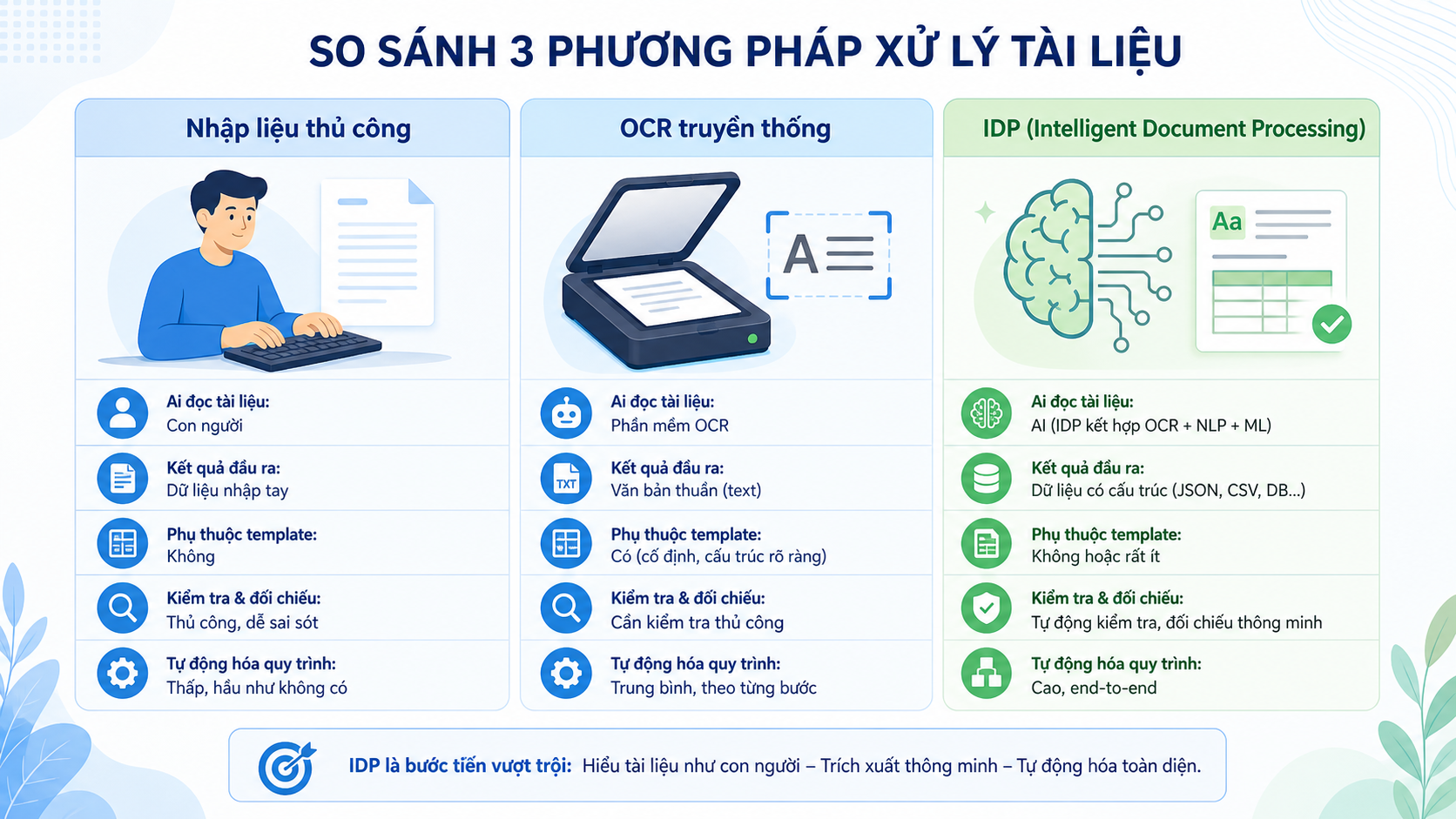
Manual data entry: accurate but labor-intensive
The traditional approach is this: a staff member opens each document, reads it by eye, then retypes the required fields into a spreadsheet or an application. To check anything, they have to open several files, cross-reference them by hand and take notes.
The advantage of this approach is flexibility — a person can handle any unusual case. But the drawbacks are considerable:
- Time-consuming and labor-intensive, especially as document volumes grow.
- Prone to errors from fatigue, wrong figures, wrong rows.
- Hard to measure or improve the process because it all lives in people's heads.
Traditional OCR: fast digitization, but no understanding of “meaning”
OCR reads images, PDFs and scanned documents and returns text. It is the technology that turns paper documents into digital data a computer can process.
However, traditional OCR has one clear limitation:
- OCR does not know which piece of text is the “customer name” and which is the “date of birth”.
- The output is usually a block of text or a table with no business meaning yet, so a person still has to read it, interpret it, extract the values and key them into the system.
- Most older OCR solutions depend on templates: they work well only with fixed forms, and any layout change means reconfiguring them.
IDP: an added “brain” layer on top of OCR
IDP doesn't replace OCR, butbuilt on OCRand adds the “understand” and “act” layers:
- Document classification: automatically recognizing whether a document is a citizen ID card (CCCD), a VAT invoice, a customs declaration, an employment contract or a financial statement.
- Extract data fields: pinpoints the regions holding “Full name”, “ID/citizen ID number”, “Customer code”, “Pre-tax total”, “Tax rate” and so on.
- Check & reconcile: compare data across the documents in a single file, and flag anything missing, incorrect, or inconsistent.
- Feed data into the process: returns results as structured data (JSON, XML, tables) and syncs them into ERP/CRM/accounting systems for further automated processing.
As a result, IDP does not just “scan quickly” — it actuallyreplacing most of the repetitive data entry and checkingacross many documentation processes.
Inside a modern IDP platform: the four core capabilities of HiTechCloud IDP
HiTechCloud IDPis an intelligent document processing platform designed for Vietnamese enterprises, combining traditional OCR technology with LLM/VLM to deliver an end-to-end pipeline — from document verification, digitization, and information extraction to in-depth business processing (invoices, KYC, loan applications, insurance, import-export documents, and more).
You can think of HiTechCloud IDP as four capability blocks:
1. Document verification
This is the first layer — making sure the file is the right type and complete.
- Automatic classification: citizen ID cards, business registration certificates, land use right certificates, contracts, invoices, customs declarations, medical records… within a single mixed set of files.
- Verify signatures and seals, detect document tampering, and flag fraud risk for reviewers to examine.
2. Document digitization
Technically, this is a combination of traditional OCR and a language model that produces “clean” data for the steps that follow.
- Convert images and scanned PDFs into text and/or DOC files that keep the layout (tables, paragraphs, headings).
- Optimized for documents of uneven quality: skewed, blurred or shadowed photos and aged documents — a very common situation in practice in Vietnam.
3. Extracting the information
This is where users most clearly “feel” the value of IDP.
- Automatically extracts data fields from many form types:
- Identity documents: citizen ID card, passport, household register.
- Company documents: business registration, VAT invoices and financial statements.
- Specialized documents: loan files, insurance files, import/export documents and medical records.
- Combining a general model (handling many document types) with specialized models fine-tuned for individual Vietnamese document types delivers very high field-level accuracy, including handwriting in many cases.
4. Business processing
Once you have the data, the story does not end at “export to CSV” — it goes on to feeding it intobusiness logicof the business.
- Apply validation rules: cross-check information across documents, check logic (date of birth must precede the issue date, the total must equal the sum of the line items, and so on) and set the record status automatically.
- Integrate into specific processes:
- Automates incoming invoice processing and expense accounting.
- Loan file assessment and customer KYC in banking and finance.
- Process insurance claim files.
- Extract and reconcile import/export documents and customs declarations.
It is this “business processing” layer that takes IDP well beyond a “scan & OCR” tool.
The practical business benefits of applying Intelligent Document Processing
When IDP is applied in the right place – typically paperwork-heavy, highly repetitive processes – businesses usually see a few very clear changes:
- Reduce document processing time: in many cases this can cut processing time substantially compared with manual data entry, depending on the use case and level of automation.
- Reduce errors, improve data quality: AI always “reads” by the rules, never tires, never “fat-fingers a number”, and the cross-check steps keep data more consistent across systems.
- Scale up without a corresponding increase in headcount:when document volume doubles, a business can largely add infrastructure capacity rather than data entry staff.
- Improve control & compliance: every action on a document is logged, with clear review rules, making the process easy to audit and compliant with audit requirements.
Next step: explore HiTechCloud IDP for your document challenge
If you are:
- You want to cut the time spent entering invoices, contracts and customer records.
- You see the operations team stuck retyping data and comparing documents one by one.
- You need to speed up the process while keeping control, an audit trail and compliance with Vietnamese data law,
then an IDP platform such asHiTechCloud IDPis a piece worth trying before you consider standing up another data entry team.
HiTechCloud IDP is built for Vietnam's document formats and regulatory context, and can be deployed on domestic cloud infrastructure or on-premises within a business's own environment. It ships with specialized models already trained for use cases such as invoices, KYC, loan applications, insurance, and logistics, which cuts go-live time down to a matter of days.
If this interests you, the next step could be to pick the most paperwork-heavy process in your business (for example, incoming invoices or loan applications) and design a small pilot with IDP to measure how much difference it makes.Contact usto get technical consulting support right away!