As you may already know,NVIDIA GPU Operatorsimplifies deploying and managing GPU nodes in Kubernetes. Initial setup is covered in the documentationVKS GPU Node Groups— but once you move into production, a new problem appears: not every GPU card can run the same driver version.
This is the typical situation you will run into:
- Older GPU cards are stuck on an older driver — for example the RTX 2080 Ti on 550.
- A group of nodes is currently running the “default” driver and working.
- A new GPU card requires a newer driver than the rest of the cluster.
Core principles:nodes whose drivers are running well are never touched unless you intend it.
Installing the driver directly on the OS without the GPU Operator is out of scope here, because it substantially increases the operational cost of managing the driver lifecycle.
Two ways to manage GPU drivers on VKS
In production you will usually have to live with several GPU driver versions at once, and this document focuses on two practical approaches to managing them with the GPU Operator. One approach is based onClusterPolicyas a global configuration, while the other approach usesNVIDIADriver CRDfor clear control at the node level.
In the rest of this guide I will walk through how each approach works, their strengths and weaknesses, and how you can migrate safely from the old pattern to the new per-node model.
Approach A: rely on ClusterPolicy and the skip label
With Approach A,ClusterPolicydefines one global GPU driver version for the whole cluster, while individual nodes can “opt out” of the upgrade through a label.
- A newly joined node picks up its driver version from the ClusterPolicy automatically.
- To freeze a node, add the skip label shown below.
- To promote a new default, freeze the existing nodes and then update the ClusterPolicy.
kubectl label node <node> nvidia.com/gpu-driver-upgrade.skip=trueGood for:clusters already running ClusterPolicy that cannot take downtime to migrate.
Limitation:you cannot install a legacy driver on a new node running an older card once ClusterPolicy has been upgraded to an incompatible newer version. The Operator will try to install the wrong driver and fail immediately.
Recommendation:Approach A is alegacy pattern. If you can accept approximately~3 minutes of GPU downtime per nodeduring the maintenance window, migrate toApproach B.
Reference: https://docs.nvidia.com/datacenter/cloud-native/gpu-operator/latest/gpu-driver-upgrades.html
Approach B: use the NVIDIADriver CRD to control each node
With approach B, each driver version is aNVIDIADriver CRof its own. Each node is given a label declaring exactly which driver version it should run. There is no global config any more, and no skip label is needed.
apiVersion: nvidia.com/v1alpha1
    kind: NVIDIADriver
    metadata:
      name: driver-550
      namespace: gpu-operator
    spec:
      driverType: gpu
      repository: vcr.hitechcloud.vn/108942-aiplatform-public
      image: driver
      version: "550.54.15"
      nodeSelector:
        nvidia.com/driver-version: "550"
      repoConfig:
        name: "custom-repo"
    ---
    apiVersion: nvidia.com/v1alpha1
    kind: NVIDIADriver
    metadata:
      name: driver-570
      namespace: gpu-operator
    spec:
      driverType: gpu
      repository: vcr.hitechcloud.vn/108942-aiplatform-public
      image: driver
      version: "570.148.08"
      nodeSelector:
        nvidia.com/driver-version: "570"
      repoConfig:
        name: "custom-repo"
A newly joined node has no driver until you apply the right label.
kubectl label node <node> nvidia.com/driver-version=570Good for:new clusters that need explicit per-node control to avoid unintended upgrades.
Tradeoff:a new node has no driver until it is labelled, so you need config or code at the node creation step.
When to choose approach A and when to choose approach B
Both approaches work, but they serve two different operating models: one favors convenience on an existing cluster, the other favors control and long-term predictability.
| Scenario | Approach A — Skip Label | Approach B — NVIDIADriver CRD |
|---|---|---|
| New cluster | Works | Works, cleaner |
| Migrate existing cluster | Zero downtime | ~3 min downtime (daemonset restart) |
| New node auto-gets driver | Yes | No — pending until labeled |
| Freeze a node | Add skip label | Don’t change its version label |
| Promote new version | Freeze all nodes + update ClusterPolicy | Create new CR, label new nodes |
| Skip labels needed | Yes | No |
A practical playbook: commands you can copy and run straight away
This section covers the hands-on steps you can copy and run to promote a new driver version or migrate between the two approaches.
Approach A — Promote new driver version
Step 1 — Freeze all current GPU nodes:
kubectl get nodes -l nvidia.com/gpu.present=true -o name | \
            xargs -I{} kubectl label {} nvidia.com/gpu-driver-upgrade.skip=true --overwrite
Step 2 — Update ClusterPolicy:
kubectl patch clusterpolicy/cluster-policy --type='json' -p='[
            {"op": "replace", "path": "/spec/driver/version", "value": "580.x.x"},
            {"op": "replace", "path": "/spec/driver/repository", "value": "vcr.hitechcloud.vn/108942-aiplatform-public"}
            ]'
Nodes joining from this point on will get driver 580.x.x.
Frozen nodes keep their current driver.
Migrate from Approach A → Approach B
This migration process requires amaintenance window. Each node will have about~3 minutes of GPU unavailabilitywhile the driver daemonset restarts.
Step 1 — Label each node with the current driver version:
# For each node, set the version label matching what it already has installed
            kubectl label node <node> nvidia.com/driver-version=570 --overwrite
Step 2 — Enable the NVIDIADriver CRD and disable ClusterPolicy driver management:
helm upgrade nvidia-gpu-operator \
              --version v25.3.1 \
              -n gpu-operator \
              oci://vcr.hitechcloud.vn/108942-aiplatform-public/helm-charts/gpu-operator \
              --set driver.nvidiaDriverCRD.enabled=true \
              --set driver.nvidiaDriverCRD.deployDefaultCR=false \
              --wait
Step 3 — Apply an NVIDIADriver CR for each version in use:
kubectl apply -f driver-550.yaml
            kubectl apply -f driver-570.yaml
            # etc.
The Operator restarts the driver DaemonSets during the switchover, roughly 3 minutes per node. After this step your cluster is on Approach B and the skip label is no longer needed.
If a driver pod stays not-ready because the GPU is held by a running process, you need to cordon and drain the node to evict the workloads.
kubectl cordon <node>
            kubectl drain <node> --ignore-daemonsets --delete-emptydir-data
            # Wait for driver pod on that node to reach Running, then uncordon
            kubectl uncordon <node>
Approach B — Promote new driver version
Step 1 — Create a CR for the new version:
kubectl apply -f - <<EOF
            apiVersion: nvidia.com/v1alpha1
            kind: NVIDIADriver
            metadata:
              name: driver-580
              namespace: gpu-operator
            spec:
              driverType: gpu
              repository: vcr.hitechcloud.vn/108942-aiplatform-public
              image: driver
              version: "580.65.06"
              nodeSelector:
                nvidia.com/driver-version: "580"
              repoConfig:
                name: "custom-repo"
            EOF
Step 2 — Label new nodes:
kubectl label node <new-node> nvidia.com/driver-version=580Existing nodes running driver-version=550 or driver-version=570 are unaffected, because their corresponding CRs do not change.
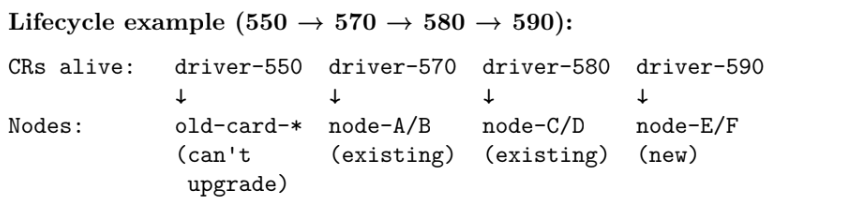
No node is affected unless you change its nvidia.com/driver-version label.
Cleanup:once every node on a given version has been decommissioned, you can delete that CR.
kubectl delete nvidiadriver driver-570How to quickly check driver versions across the cluster
You can quickly check the driver version across all GPU nodes with the command below. The original file is cut off at the end of the command, so you may need to complete the column output to suit your own needs.
kubectl get nodes -l nvidia.com/gpu.present=true \
                  -o custom-columns='NAME:.metadata.name,DRIVER:.metadata.labels.nvidia\.com/cuda\.driver\.major,VERSION-LABE
Upgrading the GPU Operator without touching drivers: what to watch for
The upgradeGPU Operatordoes not change the driver version on any node, because the Operator and the driver are two entirely separate components.
Put differently, you can treat upgrading the GPU Operator as a control-plane change, while the driver version on each node remainsClusterPolicyorNVIDIADriver CR + labeldecides.
Conclusion
UseApproach Bwhen: each node declares exactly the driver it wants, and nothing changes unless you change its label.
If you are onApproach Aand your cluster has several different generations of GPU card, migrate — Approach A does not handle that situation cleanly in the long run.