The SRV record is one of the important DNS record types, directing network traffic to specific services on a host. Understanding SRV records helps you optimize the performance of online services and keep systems stable and secure. Read on to learn more about SRV records with HiTechCloud.
What is an SRV record?
An SRV record is a type of DNS record that identifies where specific services run on a host. It acts as a map, letting users and applications find the IP address of the server providing the service they need to reach. This is particularly useful in complex environments with many services, or where a single service is deployed across several servers.
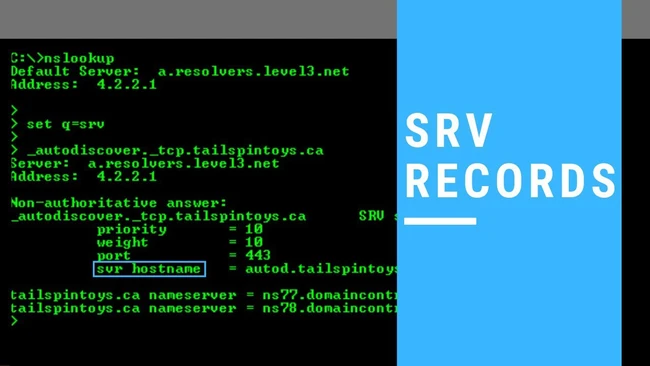
An SRV record is fundamentally a DNS record, but it is not a simple one like an A record or a CNAME. Instead, it carries more detailed information about the service it represents.
Structure of an SRV record
To understand SRV records better, we need to look closely at their structure and components. An SRV record usually consists of the following fields:
- Service name: This is the name of the service the SRV record represents. Service names normally begin with an underscore “_”.
- Protocol: Like the service name, this field also begins with an “_”. It specifies the protocol the service uses.
- Server location: This is the domain name or IP address of the server running the service.
- Port: The port on which the service listens for connections from applications or users.
- Priority: This value indicates the priority of the SRV record. Where several SRV records exist for the same service, the lower value takes precedence.
- Weight: If several SRV records share the same priority, the weight value determines the share allocated to each record.
How to create a basic SRV record
Creating an SRV record is not complicated, but you need to follow a few basic steps to make sure the record is configured correctly and behaves as intended.
Below is a step-by-step guide to creating an SRV record:
- Log in to the DNS control panel: Log in to the DNS service you are using (this may be your web hosting provider or a standalone DNS service).
- Select a domain: Select the domain you want to add the SRV record to.
- Create a new record: Find the option to add a new record and set the record type to SRV.
- Fill in the required information: Enter details such as service name, protocol, server location, port, priority and weight.
- Save and check: When you are done, save the changes and use a DNS lookup tool to check whether the SRV record was configured successfully.
Once you have created an SRV record, verifying it is important. Use tools such as dig or nslookup to confirm that the SRV record was created successfully and responds correctly to queries.
You only need to run one command:
dig _sip._tcp.example.com SRV
How do you keep SRV records working smoothly?
Below are some methods and strategies for making sure your SRV record works properly.
Optimize priority and weighting
- Priority: If several SRV records exist for the same service, set the priority values sensibly. Lower values are tried first.
- Weight: If you have several servers providing the same service, you can use weight to distribute traffic between them. A server with a higher weight receives more connections.
Monitor and maintain SRV records
Check the status of the servers and services an SRV record points to on a regular basis. If a server is no longer running or has performance problems, update the SRV record promptly to redirect traffic to another server.
Use monitoring tools
Monitoring tools can help you track the performance and health of your SRV records. They raise an alert when something goes wrong, so you can act before end users are affected.
Common errors when creating an SRV record
Below are some common errors when creating an SRV record:
Incorrect record structure
Syntax errors: an SRV record must start with an underscore (_) followed by the service name, for example _imaps._tcp.mydomain.com. If that syntax is not followed, the record will not work.
Missing required information
Missing port or hostname: an SRV record must carry complete information, including the port, the target hostname, and parameters such as priority and weight.
Incorrect IP address
Pointing to the wrong IP: make sure the IP address of the server providing the service is correct.
DNS changes not yet updated
DNS propagation time: after you create or modify an SRV record, it can take time for the change to propagate across the Internet. Check again after a while to confirm that the record has taken effect.
Problems with nameservers
Nameserver not working: check whether the name server is operating normally. If the name server has a problem, it can prevent access to the SRV record 5.
Server configuration error
Incorrect server configuration: make sure your server is configured correctly to handle requests from the SRV record. This includes checking firewall settings and access permissions.
Conclusion
An SRV record is an essential part of the DNS system, directing traffic to specific services on a server. Understanding SRV records helps you not only optimize service performance but also ensure the stability and security of your system. We hope this information proves useful as you manage your network services.